Blob Opera 2 Music Creator
Review
Blob Opera 2 Music Creator stands out for its intuitive drag controls and charming visual design. The ability to layer four vocal parts encourages experimentation with melody and harmony. It is a fantastic tool for introducing music concepts to children or for relaxing creative play. The pre-recorded songs offer helpful inspiration. A must-try for families.
Faq
About This Game
Game Introduction
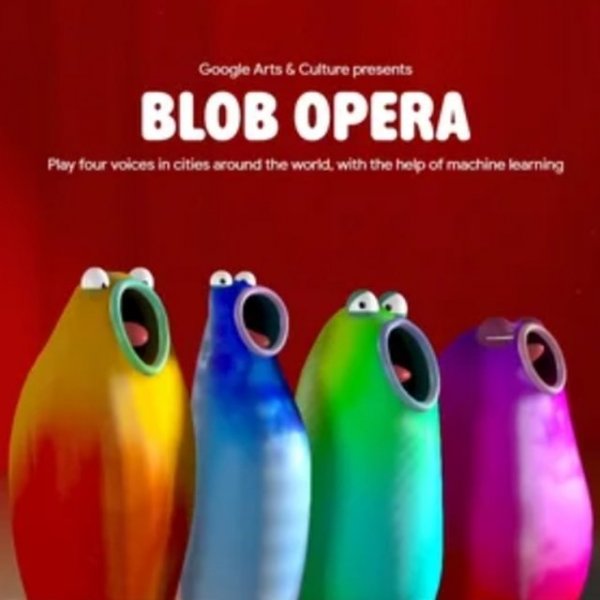
Blob Opera 2 Music Creator is an interactive browser game that turns music creation into a playful, visual experience. Players guide a quartet of colorful blobs, each with its own operatic voice, to build melodies and harmonies. The game is designed to be accessible for all ages, removing the need for musical training or expensive equipment. Instead, anyone can experiment with sound by simply moving the blobs around the screen. The core objective is to explore how different vocal parts combine to create pleasing music. What makes this game unique is its simplicity: it uses intuitive drag controls that let players focus on creativity rather than technical skill. The blobs respond in real time, providing immediate audio feedback. This makes the game both a learning tool for understanding basic music concepts and a fun way to relax. The game also includes pre-recorded songs that players can listen to for inspiration. Whether you are a child discovering melody for the first time or an adult looking for a creative outlet, Blob Opera 2 Music Creator offers a gentle, engaging introduction to music making.
How to Play
Players interact with each blob using mouse or touch input. By dragging a blob horizontally, you change the vowel sound it produces. By dragging vertically, you adjust the pitch. Combining these actions with multiple blobs lets you layer different vocal parts to create complex musical pieces. The game also includes a special feature where blobs can perform classic songs, providing inspiration for your own compositions.
Game Features
Family-friendly and safe for all ages. Intuitive controls using mouse or touch. Includes pre-recorded songs for inspiration. Works on PC, mobile phones, and tablets. Full-screen mode available. No downloads or installations required. HTML5 technology ensures smooth performance in modern browsers.
Tips for Success
Experiment freely with different blob combinations to discover pleasing harmonies. Listen to the pre-recorded songs to understand how pitch and vowel changes affect the overall sound. Practice controlling one blob at a time before layering multiple voices. Use full-screen mode for a more immersive experience. Most importantly, have fun and let your creativity guide you.
✅ Compatibility & Testing
You May Also Like
Sprunki Sound Mixing Creative Game
Sprunki , music mixing , creative game , sound design , animation , casual , family-friendly
Animal Beatbox Music Studio
Music , Creative
Sprunki Retrowave Music Creator
Sprunki , music game , retrowave , creative , online , browser
Sprunki Cendi Rhythm Music Game
Sprunki , music , rhythm
Sprunki Mini Games Online Puzzle Game
Sprunki , puzzle , family , kids , casual , online , HTML5
Sprunki Music Show Arcade
Sprunki , music show , arcade , creative , fun , family
Sprunki Music Box Harmony
music , creative