
Reviews
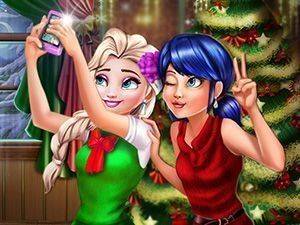
Festive Fashion Photo Studio offers a relaxed, open-ended experience perfect for young children. The separate wardrobes for two characters encourage thoughtful coordination, while the unlimited outfit changes let kids explore without pressure. The selfie feature adds a satisfying finish to each session. Its bright visuals and simple controls make it an excellent choice for family playtime.
About this game
Character Styling Basics
Players begin by selecting one of two characters to dress. Each character has a separate wardrobe, allowing for distinct looks. The selection includes several tops, bottoms, and hairstyles, all themed around winter celebrations. Children can freely browse these categories and pick items that catch their eye. The interface uses simple clicks, making it easy for younger players to navigate without frustration.
Mixing and Matching Outfits
Once a category is chosen, players can scroll through available pieces and click to apply them. The game encourages experimentation by letting users swap items as often as they like. There is no timer or score, so kids can take their time combining colors and patterns. This open-ended approach supports creative decision-making and helps build confidence in personal style choices.
Capturing the Final Look
After both characters are dressed, a camera button becomes available. Pressing it takes a selfie of the two characters together, preserving the outfit combination. Players can repeat this process multiple times, trying different ensembles and saving their favorites. This feature adds a rewarding conclusion to each styling session and gives children a sense of accomplishment.
Family-Friendly Design
The entire experience is built around calm, positive interaction. There are no competitive elements, timers, or failure states. The visuals are bright and cheerful, with soft colors and friendly character designs. This makes the game suitable for shared play between parents and children, or for independent exploration by kids as young as preschool age.
Encouraging Creative Expression
By removing restrictions, the game lets children express themselves freely. They can pair unexpected items, create themed looks, or simply enjoy the process of dressing up. This type of open-ended play supports imagination and helps develop an eye for design. The lack of right or wrong answers means every attempt is a success, fostering a positive attitude toward creative activities.









Comments
Sign in to leave a review
No account? Create one
No comments yet.